Cron format helper
This utility helps you build Cron expressions easily by choosing job scheduling scenarios. The crontab entries produced work with Vixie Cron, popular in many Linux distributions.
Vixie Cron - a quick overview
Vixie Cron is configured by editing a "crontab" file that indicates the date and times to run given commands. Each user of the system can have their own crontab file and there is also a system-wide crontab file.
The system-wide file is usually located under the "/etc" directory and called "crontab".
Changes to this file are checked and reloaded automatically but changes to user-specific crontab files wont get
picked up unless you reload them with the crontab command.
The beginning of the /etc/crontab file usually has some environment variable settings. Below that each
line in the file gives the information for a particular job to run. A typical crontab line looks something like
this:
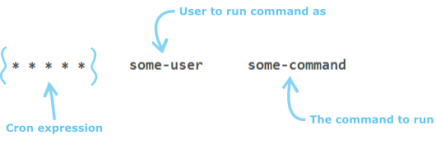
The user field ("some-user" above) is specific to the system-wide crontab file. This field isnt necessary for user-specific crontab files as commands are run as the owning user.
The command field ("some-command" above) may be a straight-forward shell command or an executable script. The path to
use to locate the script can be given in the PATH environment variable in the crontab file or you can
give absolute paths.
The bit that this utility is designed to assist with is the Cron expression. It consists of 5 fields that represent
the following:
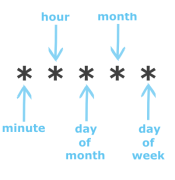
The values accepted for each field are: The minute field value must be 0-59, the hour field 0-23, the day of
month field 1-31, the month field 1-12 and the day of week field 0-6 (Sunday is 0 but this can also be given as 7).
Days can be also be given as three letter abbreviations (sun, mon, tue, wed, thu, fri, sat) as can months
(jan, feb, mar, apr, may, jun, jul, aug, sep, oct, nov, dec) but you should be careful with these as some
versions of Cron may not support them in ranges and lists (see below).
The values can be given in a variety of formats:
- An asterisk (
*) character will match all possible values for the field: e.g. the Cron expression "* * * * *" will run the command every minute since this is the smallest representable time period. - A literal value: e.g. "
30 * * * *" will run the command whenever the minute is 30, i.e. once an hour at half-past the hour.
"* * 5 * *" will run every minute when it is the 5th day of the month. - A list is given by separating each possible value using a comma: e.g. "
0,15,30,45 * * *
        *
" will run the command whenever the minute is either 0, 15, 30 or 45. Another example, "0 1,2,3 * * *" will run the command between 1am and 3am (inclusive) but only when the minute is 0, i.e. on the hour. Lists can also contain ranges (see below). - A range is given by separating the lower and upper values of the range with a hyphen
(
-): e.g. "0 1 1-5 * *" will run the command at 1am on the first, second, third, fourth and fifth days of the month. - An increment is given by using a forward slash: e.g. "
*/15 * * * *" will run the command every 15 minutes starting on the hour. i.e. this example is the same as the list example given above to run whenever the minute is 0, 15, 30 or 45.
Each of the possible formats above effectively resolves to a list of values to match. For example, if you use the *
character in the day of week field it is the same as writing 1,2,3,4,5,6,7. Another example: putting */20 in
the minute field is like writing 0,20,40. This is important to remember as it is not possible to write something like
*/70 in the minute field and expect it to run every 70 minutes - it is invalid!
It also means you can get some unexpected
behaviour - for example: say you put */40 in the minute field. This would not run every 40 minutes. It would
actually run when the minute is 0 and when it is 40. So it would run 40 minutes after the hour and then again, 20 minutes later,
on the next hour.
This utility produces true periodical expressions by only allowing factors of 60 or 24 for the minute/hour field respectively.